- +44(0)116 2787812


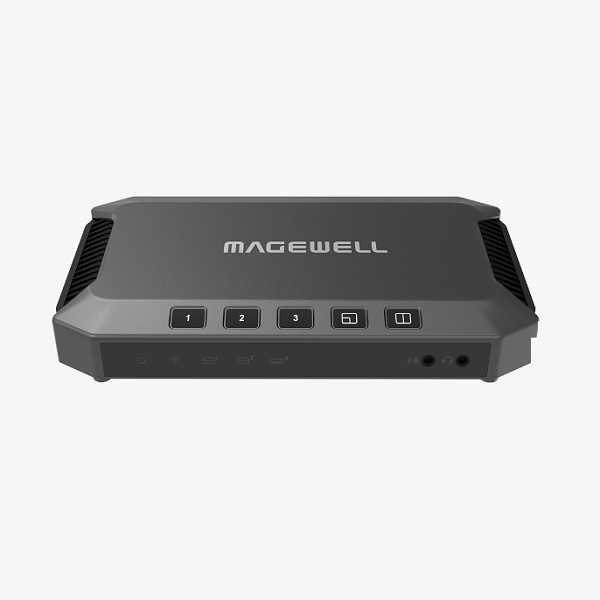


USB Fusion
£0.00
Combines live video sources for a more engaging presentation
- Supports two HDMI inputs and one USB webcam input up to 1080p at 60fps
- Switches between sources or combines two simultaneously into one output
- Companion tablet app for more advanced features
Interface
SPECIFICATION & FEATURES
Interface
Input Interface&Output Interface
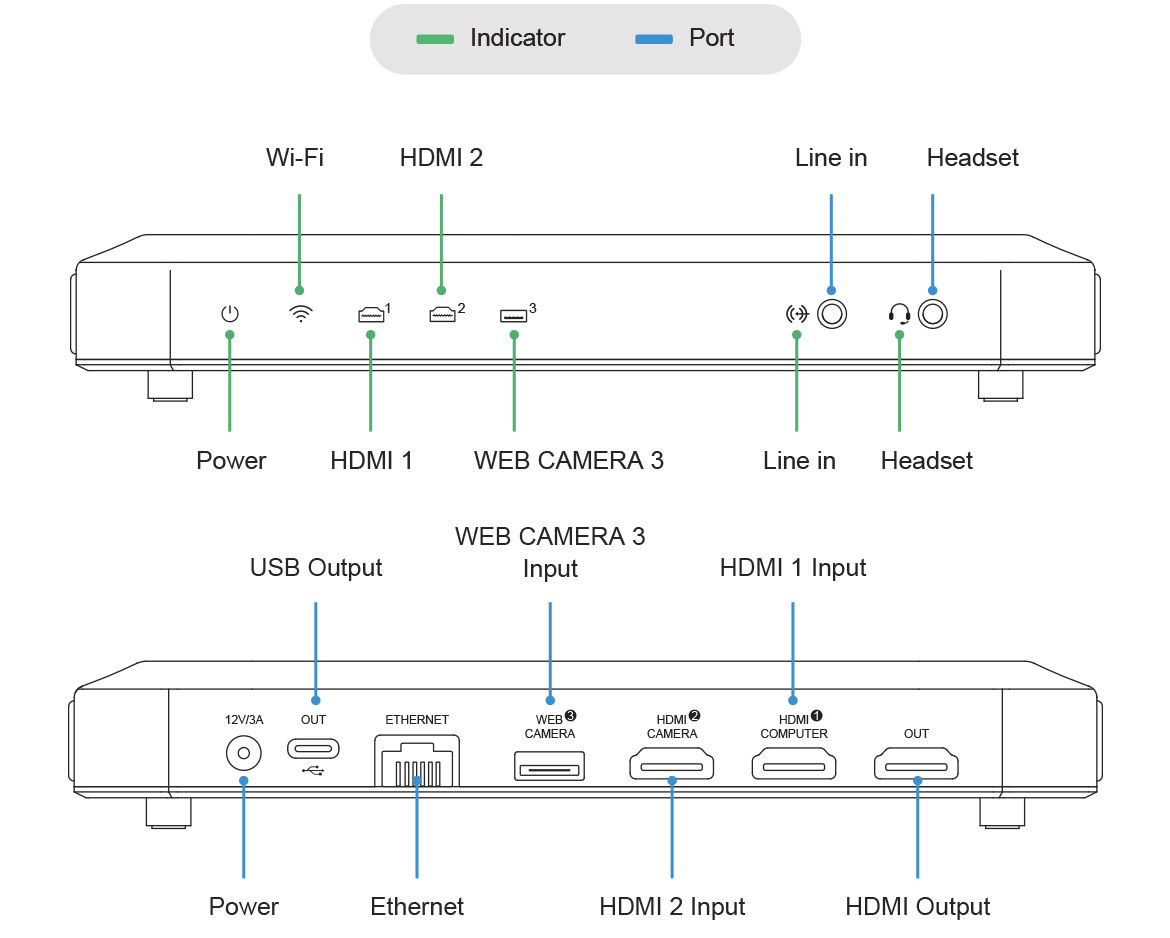
- 2x HDMI 1.4 Type-A input
- 1x USB 3.0 Type-A input
- Supports input resolution up to 1920x1080p, 60fps
- 1x USB 3.0 Type-C output
- 1x HDMI 1.4 Type-A output
Audio Input&Output Interface
- 3.5mm audio jack for line in and headset
OS
- Windows, Linux, Mac
Included Software
- USB Fusion App
Compatible Software
- Skype, Zoom, Microsoft Teams, etc
FULL SPECIFICATION & FEATURES
Scene Input
- HDMI
- Port: 2x HDMI 1.4a Type-A port (HDMI 1 / HDMI 2)
- Resolution/frame rate: up to 2048x1080p, 60fps
- Color depth: 8-bit, 10-bit, 12-bit
- Video sampling: RGB 4:4:4, YCbCr 4:4:4, YCbCr 4:2:2
- USB
- Port: 1x USB 3.0 Type-A port (WEB CAMERA 3)
- Resolution/frame rate: up to 2040x1080p, 60fps
- Codec: YUYV, H.264, MJPG, UYUV, NV12, etc.
- Screencast
- Protocols: AirPlay, Miracast, Google Cast
- Supports up to 4 devices casting simultaneously
- Imported files
- Video file: MOV, MP4, MKV
- Image file: JPEG, PNG, BMP
- PDF file
- Resolution: up to 4K, 8-bit
- Codec: H.264, HEVC (H.265)
- Web page
- Transfer protocol: HTTP, HTTPS
Audio Input
- Line in port: 1x 3.5mm jack, 2-channel, 48 KHz, 16-bit
- Headset port: 1x 3.5mm jack (CTIA standard), 2-channel, 48 KHz, 16-bit
- Up to 8-channel 24-bit HDMI-embedded audio at 192KHz
- Audio from WEB CAMERA 3 port: Up to 4-channel 24-bit audio (The audio is disabled by default, and can be enabled on Web UI.)
- Audio embedded in video files
- Audio file: MP3, M4A, WAV
- Audio of web pages
- Audio of screencast sources
Video Output
- USB OUT
- Port: 1x USB 3.0 Type-C port
- Resolution: 1920×1080, 1280×720, 640×480
- Frame rate: 60fps, 30fps, 15fps
- Video sampling: YUYV, NV12, ARGB
- HDMI OUT
- Port: 1x HDMI 1.4a Type-A port
- Output image: HDMI 1, HDMI 2, or PROGRAM image
- Output resolution: configurable, up to 2048×2048 (Actual resolution options can be limited by the negotiation result between the device and monitor.)
Audio Output
- 1x 3.5mm jack: headset port
- Format: 2-channel, 48 KHz, 16-bit
- Standard: CTIA
- Audio output via WEB CAMERA 3 port: 2-channel (The audio is disabled by default, and can be enabled on Web UI.)
- Audio output via USB OUT port: 2-channel, 48 KHz, 16-bit
- Audio output via HDMI OUT port: 2-channel, 48 KHz, 16-bit
Video Processing & Production
- HDMI source
- Video/audio signal data: auto extracted
- Color space/quantization range: calibration supported
- De-interlacing: Bob, motion adaptive, motion compensated
- EDID: self-definition supported
- USB source
- Format: selects according to the source
- Resolution/frame rate: selects according to the source
- Screencast source
- Supports turning on/off screencast protocols on Web UI
- Supports secure screencast by using on-screen code or custom password
- Supports up to 4 simultaneous wireless sources combined into a screencast scene layout
- Supports single-view or multi-view display, with a dynamic layout for multi-view display
- Supports customizing background color
- Supports dynamically crop black bars of the screen for Android devices casting through Miracast
- Supports displaying the screencast device name, image size and frame rate
- PDF source
- Supports turning pages, visiting hyperlinks, zooming in and out, etc.
- Web page source
- Supports browsing web pages, visiting hyperlinks, zooming in and out, etc.
- Supports inputting information through the remote keyboard
- Auto conversion of frame rate/color space
- Source switching: auto, manual
- Scene compositing: picture in picture, side by side
- Scene editing: crop, mirror, scale, rotate, and more
- Annotation: pens, shapes, text, and more, generated as notes for exporting
- Presentation: supports creating, importing, exporting, managing presentations, etc.
- GFX: supports adding and applying text or picture (JPG, JPEG and PNG) as GFX into the presentation
Audio Processing & Production
- Auto resampling
- Auto audio de-embedding and embedding
- Controls volume of audio output and each audio input
- Supports microphone gain
Recording and Screenshot
- Supports manual and schedule recording to local storage, with default format of 1080p60, H.264, MP4 (Recording parameters and schedule can be configured on Web UI )
- Screenshot format: JPEG, 1920×1080
- Storage space: 128 GB
- Cloud backup: supports automatically or manually uploading recorded video and screenshots to Google Drive
Provided Software
- USB Fusion App
- Creates, edits and controls presentations
- Supports HD, SD, Auto and customized preview quality
- Provides USB Clicker to control the PowerPoint on the computer connected to the USB OUT port.
- Takes and manages recordings and screenshots
- OS version: iOS 12 and later, Android 7.0 and later
- Web UI
- Configures and manages the device
- Creates, controls and manages presentations and media files
- Configures recording parameters and sets schedule recording
- Source: supports ISO recording by selecting the source to record, and selecting whether to only record the image
- Encoder: sets resolution (up to 1080p60), bitrate mode (CBR or VBR), audio (up to 48Khz, aac, 256kbps), etc.
- Storage: supports local storing as MP4 or MOV files, and splitting files by time or size
- Schedule: sets recording schedule to implement recording automatically during the specified time period
- Manages recordings and screenshots, and supports auto or manual backup to Google Drive
- Sets the login mode of the App to the device, including free login, password to login and pairing to login
- Customizes preview quality for the App
- Sets sleep
- Supports registering Magewell Cloud for centralized management
Network
- Ethernet: 1x RJ45 port, 10/100/1000 Mbps Base-T
- Wi-Fi network: IEEE 802.11 a/ac/ax (only 5G supported), Station mode or AP mode supported
- USB network: 1x USB OUT port
Compatible Software
- Skype, Zoom, Microsoft Teams, Google Meet
- Other UVC/UAC compliant, DirectShow/V4L2/AVFoundation compatible software
Compatible OS
- Windows: Windows 7 and later, Server 2008 and later (x86 & x64)
- Linux: Linux system with kernel 2.6.35 or later (x86, x64 & ARM)
- Mac: OS X 10.9 and later, macOS 10.12 and later
System Requirement for Screencast*
- AirPlay
- iPhone/iPad: iOS 12.3 or later
- Mac: macOS 10.14 or later
- Miracast
- Windows 10 or 11
- Android 4.2 or later
- Google Cast
- Windows: Core i3 or equivalent, Windows 7 or later
- Apple OS X: Macbook Pro 2010 or newer, Macbook Air 2011 or newer, OS X 10.9 or later
- Chrome OS: All 2014 models and later, 2013 Haswell-based models, and Samsung Chromebook 2
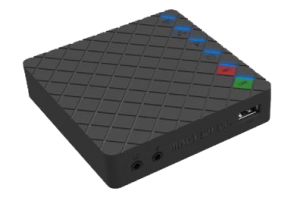
Buttons
- Switches and composites sources
- Switches screencast images and displays screencast guide
- Starts or stops pairing for “Pairing to login” mode
- Wakes up the device when it is sleeping
LED Indicators
- Power
- On: power on
- Off: power off
- Wi-Fi / HDMI 1 / HDMI 2 / WEB CAMERA 3
- On: connected
- Off: not connected
- Line-in / Headset
- On: connected
- Pulsing: not connected
Power
- Power port: 2.1mm x 5.5mm jack
- Power input: 12V/3A
Power Consumption
- Static working status: 10W
- Full-load working status: 17.5W
- Static sleeping status: 9.8–10w
- Full-load sleeping status: 14.5–14.8W
Dimensions
- 186mm x 101.2mm x 30mm
Accessories
- 1x Power adapter
- Output: 12.0V/3.33A
- 1x USB 3.0 cable
Working Environment
- Operating temperature: 0 to 40 deg C
- Storage temperature: –20 to 70 deg C
- Relative humidity: 5% to 90% non-condensing
OTHERS
- Automatic, driver-free installation for plug-and-play
- On-device buttons and LED status indicator
- 2-year warranty
- Form factor: 186mm (L) x 101.2mm (W) x 30mm (H)
Firmware

V2.4.68
258.7 MB | 2023.08.03
Descriptions:
- Support one-channel RTMP streaming via Web UI.
- Support adding multiple recording schedules for one day, daily, and weekly.
- Support specifying function for buttons on Web UI.
- Upgrade Auto Switch, supporting auto switch per signal priority.
- Enhance PDF and web page control on Web UI by expanding the control toolbar.
- Support dynamic thumbnail update on Web UI.
- Add two more sleep mode hours (8 Hours and 12 Hours).
- Support enabling Auto Reboot on wake-up.
- Support enabling and setting Auto Reboot on Web UI.
- Support setting the IP address of Wi-Fi.
- Support always displaying Telestration on the top layer.
- Support more APIs, referring to the API documents.
- App supports setting width, color or other properties separately for pen, highlighter, shape and eraser.
- App supports showing prompt when the PDF reaches the start or the end.
- Fix known issues.