- +44(0)116 2787812

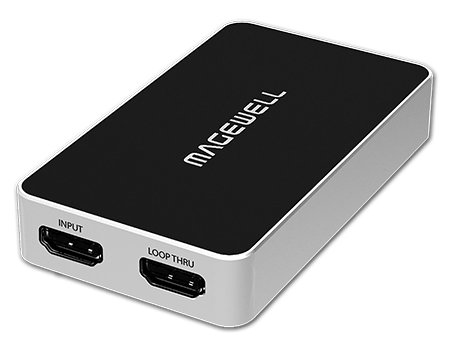
Magewell USB Capture HDMI Plus
£290.00
Magewell Part Number: 32040 One channel 2K Capture Device
- Capture HDMI + embedded audio
- Loop-through HDMI signal
- Audio input via mic
- Extract HDMI embedded audio output via headphones
- Support 4Kp60 4:2:0 input. Capture from the newest game consoles such as PS4 Pro and XBOX One S.
With a HDMI 1.4 interface, the USB Capture HDMI Plus can capture signal from PS4, Xbox One, graphics cards, HD cameras (professional/sports/surveillance/video conference) and other devices. Max input resolution and frame rate is 4960 x2160p60 (4:2:0). It automatically down scale the video to 1080p60 for recording and streaming. Different audio input and output functions have also been added to the devices. The MagewellUSB Capture HDMI Plus model captures video up to 1920×1200, 1920×1080 or 2048×1080 at 60 fps over an HDMI interface. It also supports 4K HDMI inputs at 60fps with 4:2:0 color subsampling, or at 30fps for 4:4:4, down-converting them automatically to HD for capture and recording. 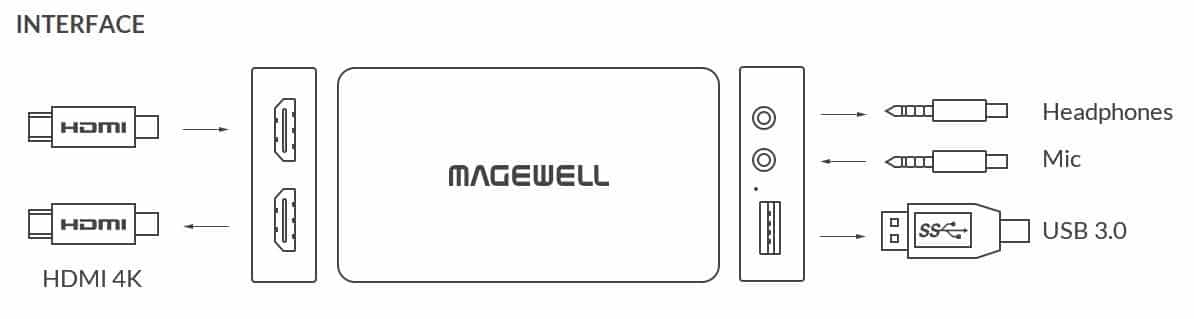 Compared to Magewell’s original USB dongles with just an HDMI or SDI input, the USB Capture HDMI Plus and SDI Plus have an input interface as well as a loop through one, which enables monitoring the image while streaming and/or recording. In addition, the new dongles have different audio input and output functions. A 3.5mm audio interface allows for capture of analog audio from a separate audio device (not embedded in HDMI input). An analogue microphone input is available for live narration during capture. This eliminates the need for an additional audio capture device. The 3.5mm headphones interface allows for playback of audio (either extracted from the embedded HDMI audio or from the analog audio input).
Compared to Magewell’s original USB dongles with just an HDMI or SDI input, the USB Capture HDMI Plus and SDI Plus have an input interface as well as a loop through one, which enables monitoring the image while streaming and/or recording. In addition, the new dongles have different audio input and output functions. A 3.5mm audio interface allows for capture of analog audio from a separate audio device (not embedded in HDMI input). An analogue microphone input is available for live narration during capture. This eliminates the need for an additional audio capture device. The 3.5mm headphones interface allows for playback of audio (either extracted from the embedded HDMI audio or from the analog audio input).How to capture the computer’s screen display using the Magewell USB Capture HDMI Plus and OBS – LINK
How to capture a 4Kp60 gameplay from the PS4 Pro using USB Capture HDMI Plus along with OBS – LINK
How to Use USB Capture Utility to Set the Capture Format – LINK
| Supported OS | Windows • Windows 7/8/8.1/10/Server 2008/Server 2008 R2/Server 2012/Server 2016 (x86 & x64) Linux (support x86, x64 & ARM architecture) • Ubuntu 12.04/14.04/16.04/17.04/17.10 (x86 & x64) • CentOS 6.5/7 (x86 & x64) • Fedora 25/26/27 (x86 & x64) • Red hat 6.5 and above (x86 & x64) • Other Linux OS with kernel version 2.6.35 and above Mac • OS X 10.9/10.10/10.11 • macOS 10.12/10.13 Chrome OS |
|---|---|
| Recommended OS (tested) | Windows • Windows 7 Ultimate/8.1 Enterprise/10 Enterprise/Server 2008 R2 DataCenter/Server 2012 R2 DataCenter/Server 2016 R2 DataCenter (x86 & x64) Linux • Ubuntu 12.04/14.04/16.04 (x86 & x64) • Ubuntu 17.04/17.10 (x64) • CentOS 6.5/7.2 (x86 & x64) • Fedora 25/26 (x64) • Red hat 6.5 (x86 & x64) Mac • OS X 10.9.5/10.10/10.11.2/10.11.3/10.11.4 • macOS 10.12/10.13.2/10.13.3 |
| Supported APIs | Windows • DirectShow • Wave API/DirectSound/WASAPI Linux • V4L2 • ALSA OS X/macOS • QuickTime • AV Foundation |
| Supported Software | VLC VirtualDub OBS XSplit vMix VidBlaster Wirecast Microsoft Media Encoder Adobe Flash Media Encoder Any other DirectShow, V4L2, QuickTime, AV Foundation based encoding or streaming software |
| Input Interfaces | DVI-I • DVI 1.0 • HDMI 1.4a (via breakout cable) • VGA (via DVI-to-VGA convertor) • Component (via breakout cable) 3.5mm audio jack • unbalanced Line In interface |
| Host Interface | USB 3.0 • compatible with USB 2.0 • compatible with USB 3.1 Gen 1 |
| Output Interface | 3.5mm audio jack • unbalanced Line Out interface |
| Input features | Auto scan of video input sources when there is no signal input to the currently selected input source Manual selection of video input source Auto selection of linked (embedded) audio input source when the video input source changes Manual selection of audio input source Support for input video resolutions up to 2048x2160 |
| VGA & Component Specific Feature | 12-bit ADC Support for RGB & YCbCr (YUV) color formats Support for ‘Seperated sync’, ‘Composite sync’, ‘Sync-on-green’ (SOG), ‘Sync-on-luminance’ (SOY) Support for DMT, CEA, CVT, GTF video timings Input signals up to 165MHz pixel rate are digitized with 1:1 sampling Input signals over 165MHz pixel rate can be digitized with horizontal sub-sampling (resulting in some image quality loss - NOT recommended) Auto detection of RGB & YCbCr color formats Auto or manual sampling phase adjustment Auto horizontal alignment Support for customized video timings Support for customized video resolutions for CVT/GTF timings |
| HDMI Specific Features | 225MHz HDMI receiver Adaptive HDMI equalizer support for cables lengths up to 30M Support for customized EDID Support for extraction of AVI/Audio/SPD/MS/VS/ACP/ISRC1/ISRC2/Gamut InfoFrames Full colorimetry support Support for 8/10/12-bit color depths Support for RGB 4:4:4, YCbCr 4:4:4, YCbCr 4:2:2 color sampling Support for up to 2 channel IEC60958 audio streams Support for extraction of audio formation information & channel status data Support for extraction of video timing information Support for extraction of 3D format information Support for Side-by-Side Half, Top-and-Bottom, Frame Packing 3D mode. |
| Analog Audio Features | Extraction of stereo embedded HDMI audio for recording and output via 3.5mm stereo mini-jack Line Out Capture of stereo analog audio from Line In (3.5 mm stereo mini-jack socket) |
| Video Capture format | Support for capture resolutions up to 2048x2160 Support for capture frame rates up to 120fps (Actual capture frame rate can be limited by the USB bandwidth and internal working frequency. Typical capture frame rates on the Intel USB 3.0 controller are as follows.) • 1920x1080 YUY2 (up to 75fps) • 1920x1080 RGB24 (up to 60fps) Support for YUY2 & UYVY 4:2:2 8-bit Support for RGB24 & RGB32 4:4:4 8-bit The default capture format is YUY2. More capture format can be set using USB Capture Utility. |
| Video Processing Features | Video processing pipelines with 160 Mpixels/s processing bandwidth Video cropping Video scaling Video de-interlacing • Weave • Blend top & bottom field • Top field only • Bottom field only Video aspect ratio conversion • Auto or manual selection of input aspect ratio • Auto or manual selection of capture aspect ratio • Three aspect ratio conversion modes: Ignore (Anamorphic), Cropping or Padding (Letterbox or Pillarbox) Video color format conversion • Auto or manual selection of input color format & quantization range • Auto or manual selection of capture color format, quantization range & saturation range • Support for RGB, YCbCr 601, YCbCr 709 color formats • Support for Limited or Full quantization range • Support for Limited, Full & ‘Extended gamut’ saturation range Video frame rate conversion Vertical flip and mirror |
| Multiple devices on one computer | Support for connecting multiple USB devices to one system Support for setting the device serial number as the device name shown in the system using USB Capture Utility |
| SDK | The USB Capture SDK provide functions including signal status extraction, capture configuration, etc. |
| Firmware Upgrade | Multiple devices in one system can be upgraded simultaneously |
| LED Indicator | Status LEDs indicate the working state of each channel: idle, input signal locked, memory failed or FPGA configuration failed. |
| Form Factor | 101.5mm (L) x 56.8mm (W) x 17mm (H) |
| Accessories | USB 3.0 cable DVI to VGA connector DVI-I to HDMI + Component breakout DB9 to YC + Composite + Analog Audio + Component breakout |
| Power Consumption | 5V max current: 600mA max power consumption:~ 3W |
| Working Environment | Operating temperature: 0 to 50 deg C Storage temperature: –20 to 70 deg C Relative Humidity: 5% to 90% non-condensing |
SPECIFICATIONS
Supported OS
- Windows
- Windows 7/8/8.1/10/Server 2008/Server 2008 R2/Server 2012/Server 2016 (x86 & x64)
- Linux (support x86, x64 & ARM architecture)
- Ubuntu 12.04/14.04/16.04/17.04/17.10/18.04 (x86 & x64)
- CentOS 6.5/7 (x86 & x64)
- Fedora 25/26/27 (x86 & x64)
- Red hat 6.5 and above (x86 & x64)
- Other Linux OS with kernel version 2.6.35 and above
- Mac
- OS X 10.9/10.10/10.11
- macOS 10.12 and above
- Chrome OS
Recommended OS (tested)
- Windows
- Windows 7 Ultimate/8.1 Enterprise/10 Enterprise/Server 2008 R2 DataCenter/Server 2012 R2 DataCenter/Server 2016 R2 DataCenter (x86 & x64)
- Linux
- Ubuntu 12.04/14.04/16.04 (x86 & x64)
- Ubuntu 17.04/17.10/18.04 (x64)
- CentOS 6.5/7.2 (x86 & x64)
- Fedora 25/26 (x64)
- Red hat 6.5 (x86 & x64)
- Mac
- OS X 10.9.5/10.10/10.11.2/10.11.3/10.11.4
- macOS 10.12/10.13.2/10.13.3/10.14.3/10.15
Supported APIs
- Windows
- DirectShow
- Wave API/DirectSound/WASAPI
- Linux
- V4L2
- ALSA
- macOS
- AVCaptureSession
- AudioUnit
Compatible Software
- Zoom
- Skype
- Mircosoft Teams
- GoToMeeting
- Gstreamer
- VLC
- OBS Studio
- XSplit
- QuickTime Player
- Any other DirectShow/V4L2/AVCaptureSession based encoding or streaming software
Input Interfaces
- HDMI
- DVI-D 1.0
- HDMI 1.4
- 3.5mm audio jack
- Microphone interface
Host Interface
- USB 3.0
- compatible with USB 2.0
- compatible with USB 3.1 Gen 1
Output Interface
- 3.5mm audio jack
- headphones interface
Loop-through Interface
- HDMI
- DVI-D 1.0
- HDMI 1.4
Input features
- Support for input video resolutions up to 4096×2160
HDMI Specific Features
- 297MHz HDMI receiver
- Adaptive HDMI equalizer support for cables lengths up to 30M
- Support for customized EDID
- Support for extraction of AVI/Audio/SPD/MS/VS/ACP/ISRC1/ISRC2/Gamut InfoFrames
- Full colorimetry support
- Support for up to 4096×2160 4:4:4/4:2:2 30fps or 4096×2160 4:2:0 60fps input signals
- For 4:2:0 input signals, the horizontal and vertical resolution will be reduced to 1/2 for capturing
- For 4:4:4/4:2:2 input signal at more than 170MHz, the horizontal resolution will be reduced to 1/2 for capturing
- Support for 2 channel IEC60958 audio streams
- Support for extraction of audio formation information & channel status data
- Support for extraction of video timing information
- Support for extraction of 3D format information
- Support for Side-by-Side Half, Top-and-Bottom, Frame Packing 3D mode.
Analog Audio Features
- Extraction of stereo embedded HDMI audio for recording and output via 3.5mm stereo mini-jack Line Out
- Capture of analog audio via 3.5 mm microphone interface
- Integrate the functions of a USB audio card. Playback audio via 3.5 mm headphones interface. Support for recording the playback audio of the computer.
Video Capture format
- Support for capture resolutions up to 2048×2160
- Support for capture frame rates up to 120fps (Actual capture frame rate can be limited by the USB bandwidth and internal working frequency. Typical capture frame rates on the Intel USB3.0 controller are as follows.)
- 1920×1080 YUY2 (up to 70fps)
- 1920×1080 RGB24 (up to 60fps)
- Support for YUY2 & UYVY 4:2:2 8-bit
- Support for RGB24 & RGB32 4:4:4 8-bit
- The default capture format is YUY2. More capture formats can be set using USB Capture Utility.
Video Processing Features
- Video processing pipelines with 160 Mpixels/s processing bandwidth
- Video cropping
- Video scaling
- Video de-interlacing
- Weave
- Blend top & bottom field
- Top field only
- Bottom field only
- Video aspect ratio conversion
- Auto or manual selection of input aspect ratio
- Auto or manual selection of capture aspect ratio
- Three aspect ratio conversion modes: Ignore (Anamorphic), Cropping or Padding (Letterbox or Pillarbox)
- Video color format conversion
- Auto or manual selection of input color format & quantization range
- Auto or manual selection of capture color format, quantization range & saturation range
- Support for RGB, YCbCr 601, YCbCr 709, YCbCr 2020 color formats
- Support for Limited or Full quantization range
- Support for Limited, Full & ‘Extended gamut’ saturation range
- Video frame rate conversion
- Vertical flip and mirror
Multiple devices on one computer
- Support for connecting multiple USB devices to one system
- Support for setting the device serial number as the device name shown in the system using USB Capture Utility
SDK
- The USB Capture SDK provide functions including signal status extraction, capture configuration and real-time audio & video capture, etc.
Firmware Upgrade
- Multiple devices in one system can be upgraded simultaneously
LED Indicator
- Status LEDs indicate the working state of each channel:
- Pulsing slowly: idle
- On: input signal locked
- Off: input signal unlocked
- Double blinks: memory failed or FPGA configuration failed
Form Factor
- 98.1mm (L) x 56.8mm (W) x 17mm (H)
Accessories
- USB 3.0 cable
Power Consumption
- 5V max current: 900mA
- Max power consumption: ~ 4.5 W
Working Environment
- Operating temperature: 0 to 50 deg C
- Storage temperature: –20 to 70 deg C
- Relative Humidity: 5% to 90% non-condensing
ACCESSORIES
INCLUDED
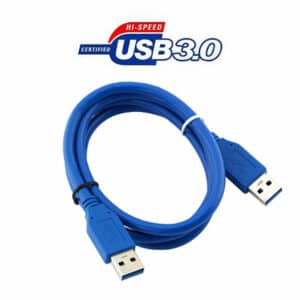
USB 3.0 Cable P/B: 90062