- +44(0)116 2787812


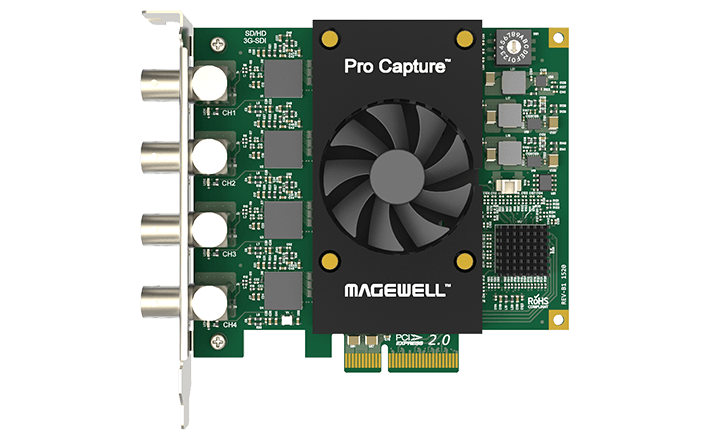
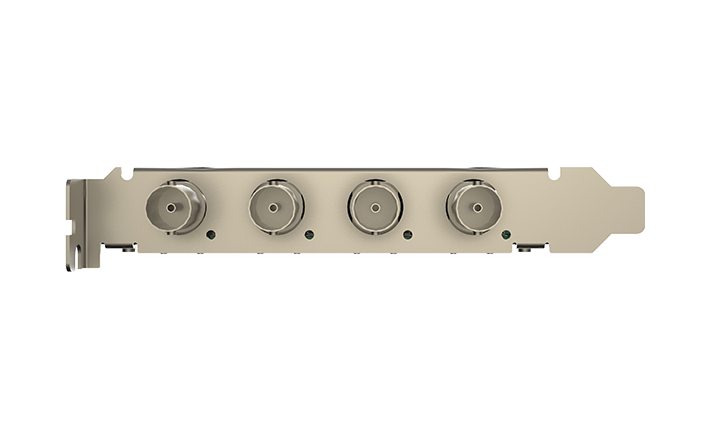
Magewell Pro Capture Quad SDI
£768.00
Magewell Part Number: 11090 Four-channel SDI Capture Card
- Captures SD/HD/3G-SDI x 4
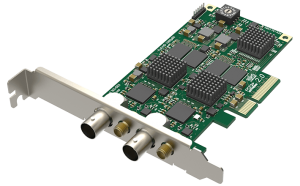
The Magewell Pro Capture Quad SDI Card is a normal-profile PCIe Gen2 x4 card. Allowing for capturing 4 channels of SDI input. The card supports multiple color sampling modes, 10- and 12-bit color depths. Up to 8 audio channels at 48 kHz. Output resolutions up to 2048×2048 with frame rates up to 120 fps. The card is also capable of numerous video processing features. Including cropping, scaling, de-interleaving, aspect ratio conversion, color format conversion, video frame rate conversion, and video OSD composition.
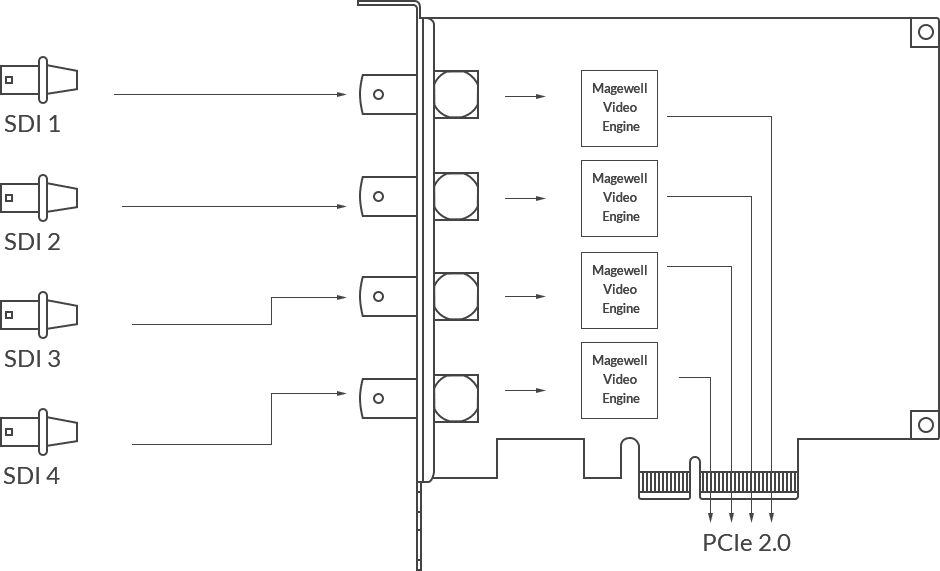
Magewell Pro Capture Quad SDI Card supports multiple cards per system. Along with unlimited output streams. Independently adjustable parameters per stream. Additional features include ultra-low latency, timestamp and A/V synchronization, and LED status indicators. The card supports both Windows, Linux, and Mac operating systems, multiple APIs for Windows and Linux. Provides Windows SDKs for easier integration.
How to use OBS Studio to record and stream along with Magewell capture devices – LINK
| Supported OS | Windows • Windows 7/8/8.1/10/Server 2008/Server 2008 R2/Server 2012/Server 2016 (x86 & x64) Linux (support x86, x64 & ARM architecture) • Ubuntu 12.04/14.04/16.04/17.04/17.10 (x86 & x64) • CentOS 6.5/7 (x86 & x64) • Fedora 25/26/27 (x86 & x64) • Red hat 6.5 and above (x86 & x64) • Other Linux OS with kernel version 2.6.35 and above |
|---|---|
| Recommended OS (tested) | Windows • Windows 7 Ultimate/8.1 Enterprise/10 Enterprise/Server 2008 R2 DataCenter/Server 2012 R2 DataCenter/Server 2016 R2 DataCenter (x86 & x64) Linux • Ubuntu 12.04/14.04/16.04 (x86 & x64) • Ubuntu 17.04/17.10 (x64) • CentOS 6.5/7.2 (x86 & x64) • Fedora 25/26 (x64) • Red hat 6.5 (x86 & x64) |
| Supported APIs | Windows • DirectShow • DirectKS • Wave API/DirectSound/WASAPI Linux • V4L2 • ALSA |
| Supported Software | VLC VirtualDub OBS XSplit vMix VidBlaster Wirecast Microsoft Media Encoder Adobe Flash Media Encoder Any other DirectShow, V4L2, QuickTime, AV Foundation bbased encoding or streaming software |
| Input Interfaces | 4x HD-BNC • SD/HD/3G/2K SDI |
| Output Interfaces | 2x HD-BNC • SD/HD/3G/2K SDI |
| Host Interface | PCIe Gen2 x4 |
| Input features | Integrated cable equalizer supporting cable lengths up to 230M for HD-SDI signals Support for SD/HD/3Ga/3Gb/3Ga-DL/3Gb-DS standards Support for 2K (2048x1080) mode Support for RGB 4:4:4, YCbCr 4:4:4, YCbCr 4:2:2 color sampling Support for 3Gb-DL. Combine input channel 1&2 or 3&4 to one dual-link for input Support for 10/12-bit color depth Support for extraction of SMPTE 352 payload identifier Support for up to 16 audio channels at 48KHz Support for extraction of audio information and channel status Support for extraction of timecode Support for obtaining ANC data Limited support of 3Gb-DS: only the first stream can be captured |
| Video Capture Formats | Support for video resolutions up to 2048x1080 Support capture format 4:2:0 8-bit: NV12, I420, YV12 Support capture format 4:2:2 8-bit: YUY2, YUYV, UYVY Support capture format 4:4:4 8-bit: V308, IYU2, V408, BGR24, BGR32 Support capture format 4:4:4 10-bit: V410, Y410 More capture format can be set using Flex I/O SDK (based on DirectKS) |
| Video Processing Features | Two video processing pipelines with 180 Mpixels/s processing bandwidth Fully capable of processing at 10 bit Video cropping Video scaling Video de-interlacing • Weave • Blend top & bottom field • Top field only • Bottom field only Video aspect ratio conversion • Auto or manual selection of input aspect ratio • Auto or manual selection of output aspect ratio • Three aspect ratio conversion modes: Ignore (Anamorphic), Cropping or Padding (Letterbox or Pillarbox) Video color format conversion • Auto or manual selection of input color format & quantization range • Auto or manual selection of output color format, quantization range & saturation range • Support for RGB, YCbCr 601, YCbCr 709, YCbCr 2020 color formats • Support for Limited or Full quantization range • Support for Limited, Full & ‘Extended gamut’ saturation range Video frame rate conversion Video OSD composition • Support for PNG OSD image (up to 2048×2160) • Support for dynamic loading of RGBA OSD image via SDK |
| Deliver Multiple Streams of Captured video | For any one input channel, deliver multiple streams to the computer Independent cropping, aspect ratio, color format, resolution, frame rate, de-interlacing, color adjustment and OSD settings for each individual stream |
| Video capture SG-DMA | ~400MB/s per channel DMA bandwidth in PCIe 2.0 system ~200MB/s per channel DMA bandwidth in PCIe 1.0 system Support for auto detection of Intel tiled GPU surface Support for DirectGMA by AMD GPU Support for GPUDirect by Nvidia GPU |
| Video Playback Features | Integrated cable driver supporting cable lengths up to 230M for HD-SDI signals Support for SD/HD/3Ga/3Gb/3Ga-DL/3Gb-DS standards Support for 2K (2048×1080) mode Support for RGB 4:4:4, YCbCr 4:4:4, YCbCr 4:2:2 color sampling Support for 3Gb-DL. Combine two output channels to one dual-link for output Support for 10/12-bit color depth Support for up to 16 audio channels at 48KHz Support for timecode output Support for custom ANC data output |
| Video Playback Format | Support for video resolutions up to 2048x1080 Support for output format 4:2:0 8-bit : NV12,I420 Support for output format4:2:2 8-bit : YUY2, UYVY Support for output format4:4:4 8-bit : V308, IYU2, V408, BGR24, BGR32 Support for output format 4:4:4 10-bit : V410, Y410 |
| Video Playback Processing Features | Video processing pipelines with 180 Mpixels/s processing bandwidth Fully capable of processing at 10 bit Video scaling Video aspect ratio conversion • Auto or manual selection of input aspect ratio • Auto or manual selection of output aspect ratio • Three aspect ratio conversion modes: Ignore (Anamorphic), Cropping or Padding (Letterbox or Pillarbox) Video color format conversion • Auto or manual selection of input color format & quantization range • Auto or manual selection of output color format, quantization range & saturation range • Support for RGB, YCbCr 601, YCbCr 709, YCbCr 2020 color formats • Support for Limited or Full quantization range • Support for Limited, Full & ‘Extended gamut’ saturation range Video frame rate convert & output or directly output |
| Video playback SG-DMA | ~400MB/s per channel DMA bandwidth in PCIe 1.x system ~600MB/s per channel DMA bandwidth in PCIe 2.x system Support for DirectGMA by AMD GPU Support for GPUDirect by Nvidia GPU |
| Multiple devices on one computer | Support for multiple cards plugged to one system On-board rotary switch to set card number, with 16 positions from 0 to F System hardware device tree will display “01: Flex I/O 4i2o” when rotary switch is set to 1, and so on The video and audio device names displayed in your software will include the card number (set by the rotary switch) |
| Ultra Low Latency Support | Latency of 64 video lines Partial notification mode in SDK |
| Timestamp & A/V Synchronization | Hardware based 100ns high resolution clock Audio frames (192 audio samples) & video frames are stamped with hardware clock Hardware clock can be synchronized across cards (via SDK) |
| SDK | Flex I/O SDK for DirectShow provides the developer a quick way to integrate the extended features of the cards (Windows) Flex I/O SDK for DirectKS provides the developer the most flexibility and highest performance(Windows) |
| Windows Driver Tweaks | All options can be controlled by three levels of registry key: global level, product level and device level Video, Audio, Crossbar filter names can be customized via registry keys |
| Firmware Upgrade | Multiple cards in one system can be upgraded simultaneously Cards can be upgraded without a system power shutdown when it is not in use Safe upgrade. If power off or system break down occur when the firmware is being upgraded, it will automatically restore to the initial version. This function is only available for firmware version 1.21 and above. |
| LED Indicator | Status LEDs indicate the working state of each channel: • Pulsing slowly: idle • On: input signal locked • Off: input signal unlocked • Double blinks: memory failed or FPGA configuration failed |
| Form Factor | Normal profile PCIe x4 Add-on Card 140mm x 91mm (without PCI bracket) |
| Power Consumption | 12V max current: TBD 3.3V max current: TBD Max power consumption: TBD |
| Working Environment | Operating temperature: 0 to 40 deg C Storage temperature: –20 to 70 deg C Relative Humidity: 5% to 90% non-condensing |
SPECIFICATIONS
Pro Capture Quad SDI Specifications
Supported OS
- Windows
- Windows 7/8/8.1/10/Server 2008/Server 2008 R2/Server 2012/Server 2016 (x86 & x64)
- Linux (support x86, x64 & ARM architecture)
- Ubuntu 12.04/14.04/16.04/17.04/17.10/18.04 (x86 & x64)
- CentOS 6.5/7 (x86 & x64)
- Fedora 25/26/27 (x86 & x64)
- Red hat 6.5 and above (x86 & x64)
- Other Linux OS with kernel version 2.6.35 and above
- Mac
- OS X 10.9/10.10/10.11
- macOS 10.12 and above
Recommended OS (tested)
- Windows
- Windows 7 Ultimate/8.1 Enterprise/10 Enterprise/Server 2008 R2 DataCenter/Server 2012 R2 DataCenter/Server 2016 R2 DataCenter (x86 & x64)
- Linux
- Ubuntu 12.04/14.04/16.04 (x86 & x64)
- Ubuntu 17.04/17.10/18.04 (x64)
- CentOS 6.5/7.2 (x86 & x64)
- Fedora 25/26 (x64)
- Red hat 6.5 (x86 & x64)
- Mac
- OS X 10.9.5/10.10/10.11.2/10.11.3/10.11.4
- macOS 10.12/10.13.2/10.13.3/10.14.3/10.15
Supported APIs
- Windows
- DirectShow
- DirectKS
- Wave API/DirectSound/WASAPI
- Linux
- V4L2
- ALSA
- macOS
- AVCaptureSession
- AudioUnit
Supported Software
- VLC
- VirtualDub
- OBS
- XSplit
- vMix
- VidBlaster
- Wirecast
- Microsoft Media Encoder
- Adobe Flash Media Encoder
- Any other DirectShow/V4L2/AVCaptureSession encoding/streaming software
Input Interfaces
- 4x BNC
- SD/HD/3G SDI
Host Interfaces
- PCIe Gen2 x4
Input Features
- Support for input video resolutions up to 2048×1080 pixels
SDI Specific Features
- Integrated cable equalizer extending the cable length as follows:
- up to 330m for SD-SDI signals
- up to 190m for HD-SDI signals
- up to 150m for 3G-SDI signals
- Support for SD/HD/3Ga/3Gb/3Gb-DL/3Gb-DS standards
- Support for 2K (2048×1080) mode
- Support for RGB 4:4:4, YCbCr 4:4:4, YCbCr 4:2:2 color sampling
- Support for 10/12-bit color depth
- Support for extraction of SMPTE 352 payload identifier
- Support for up to 8 (mono) audio channels at 48KHz (channels 1–8 from the 16 available in the SDI spec)
- Support for extraction of audio formation information & channel status data
- Limited support of 3Gb-DS: only the first stream can be captured
- Limited support for capture of the first link of dual link interfaces:
- YCbCr 4:2:2 10-bit 1080p 50/59.94/60: captured as 1080i 50/59.94/60
- YCbCr 4:4:4 10-bit: captured as 4:2:2
- RGB 4:4:4: R/B sub-sampled
- Support for Closed Caption via SDK
Video Capture Formats
- Support for capture image resolutions up to 2048×2160 pixels
- Support for capture frame rates up to 144fps (Actual capture frame rate can be limited by PCIe bandwidth, and at higher image resolutions – above 1280×1024 – by the pixel clock of the on-board video processing hardware. eg. Max frame rate at 1920×1080 = ~80fps. )
- Support for 4:2:0 8-bit capture formats: NV12, I420, YV12
- Support for 4:2:2 8-bit capture formats: YUY2, YUYV, UYVY
- Support for 4:4:4 8-bit capture formats: V308, IYU2, V408, BGR24, BGR32
- Support for 4:4:4 10-bit capture formats: V410, Y410
- More capture formats are supported via Magewell Capture SDK
Video Processing Features
- Two video processing pipelines with ~180Mpixels/s processing bandwidth for each one
- Full 10-bit video processing
- Video cropping
- Video scaling
- Video de-interlacing
- Weave
- Blend top & bottom field
- Top field only
- Bottom field only
- Video aspect ratio conversion
- Auto or manual selection of input aspect ratio
- Auto or manual selection of capture aspect ratio
- Three aspect ratio conversion modes: Ignore (Anamorphic), Cropping or Padding (Letterbox or Pillarbox)
- Video color format conversion
- Auto or manual selection of input color format & quantization range
- Auto or manual selection of capture color format, quantization range & saturation range
- Support for RGB, YCbCr 601, YCbCr 709, YCbCr 2020 color formats
- Support for Limited or Full quantization range
- Support for Limited, Full & ‘Extended gamut’ saturation range
- Video frame rate conversion
- Video OSD composition
- Support for PNG OSD image (up to 2048×2160)
- Support for dynamic loading of RGBA OSD image via SDK
Multiple Cards per System
- Support for multiple cards plugged to one system
- On-board rotary switch to set card number, with 16 positions from 0 to F
- System hardware device tree will display “01: Pro Capture Quad SDI” when rotary switch is set to 1, and so on
- The video and audio device names displayed in your software will include the card number (set by the rotary switch)
Multiple Capture Streams
- Unlimited capture streams for any one input channel
- Independent cropping, aspect ratio, color format, resolution, frame rate, de-interlacing and color adjustment settings for each individual stream
Ultra Low Latency Support
- Latency of 64 video lines
- Partial notification mode in SDK
Timestamp & A/V Synchronization
- Hardware based 100ns high resolution clock
- Audio frames (192 audio samples) & video frames are stamped with hardware clock
- Hardware clock can be synchronized across cards (via SDK)
Video Capture SG-DMA
- ~400MB/s per channel DMA bandwidth in PCIe 2.0 system
- ~200MB/s per channel DMA bandwidth in PCIe 1.0 system
- Support for auto detection of Intel tiled GPU surface
- Support for DirectGMA for AMD video adapter chipsets
- Support for GPUDirect for Nvidia video adapter chipsets
SDK
- Magewell Capture SDK for easy integration, maximum flexibility and performance
Windows Driver Tweaks
- All options can be controlled by three levels of registry key: global level, product level and device level
- Video, Audio, Crossbar filter names can be customized via registry keys
Firmware Upgrade
- Multiple cards in one system can be upgraded simultaneously
- Cards can be upgraded without a system power shutdown (In most cases, even a reboot is not needed)
- Safe upgrade. If power off or system break down occur when the firmware is being upgraded, it will automatically restore to the initial version. This function is only available for firmware version 1.21 and above.
LED Indicator
- Status LEDs indicate the working state of each channel:
- Pulsing slowly: idle
- On: input signal locked
- Off: input signal unlocked
- Double blinks: memory failed or FPGA configuration failed
Form Factor
- Normal profile PCIe x4 Add-on Card
- 112.15mm x 102.92mm (without PCI bracket)
Power Consumption
- Max current at 12V: ~ 0.77 A
- Max current at 3.3V: ~ 2.52 A
- Max power consumption: ~ 17.1 W
Working Environment
- Operating temperature: 0 to 40 deg C
- Storage temperature: –20 to 70 deg C
- Relative Humidity: 5% to 90% non-condensing
ACCESSORIES
INCLUDED