- +44(0)116 2787812

Director Mini
£0.00
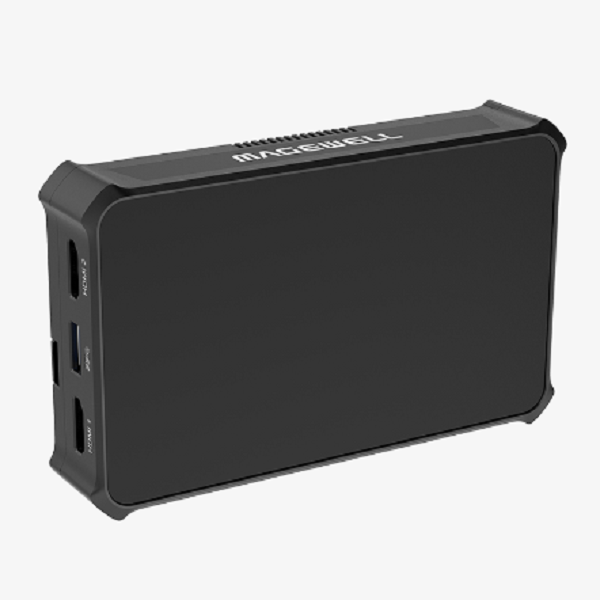
A portable device that does multi-input switching, graphics, streaming, recording and monitoring
- Supports flexible input sources ranging from AV and IP streams to media files
- Intuitive user interface and companion app for scene editing and creating shows
- Rich output possibilities including RTMP and SRT streams, NDI® HX3 and local displays
Interface
SPECIFICATION & FEATURES
Inputs
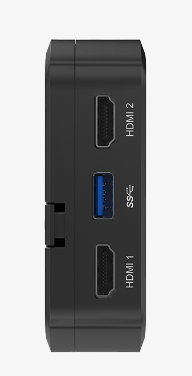
- Two HDMI inputs
- Two USB AV inputs
- Three simultaneous live IP sources (SRT, RTMP)
- Two NDI® HX2 or HX3 sources
- Mobile camera (via Director Utility App)
- Media files (video, image, music, etc.)
Features
- Shows can be created in landscape (16:9) or portrait (9:16) mode
- A show can consist of multiple scenes
- Powerful production tools including chroma keying, graphics, telestration and more
- Display multiple graphics including titles, lower thirds, a scoreboard, timer, stopwatch and more
Streaming
- Natively supports streaming to YouTube, Twitch and Facebook Live
- Stream via SRT, RTMP and NDI® HX3
- Stream to two destinations simultaneously at the same or different bitrates
Recording and screenshot
- Recording or screenshot files could be saved to local storage (64GB), SD card or USB flash drive
- Split recording files by time or size
Included Software
- Director Utility App
Network
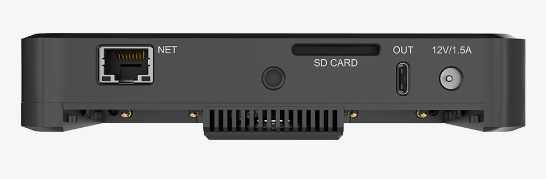
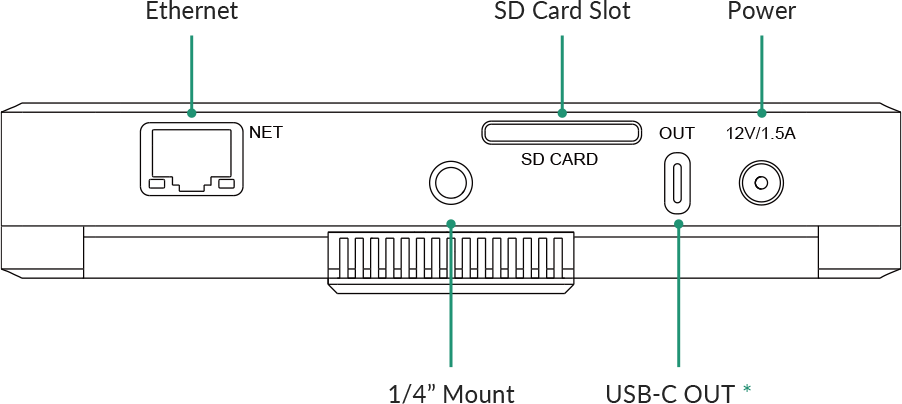
- Ethernet: 1x RJ45 port, 10/100/1000 Mbps Base-T
- WiFi: 2.4G/5G, Station and AP modes are both supported
FULL SPECIFICATION & FEATURES
Video Input
- HDMI
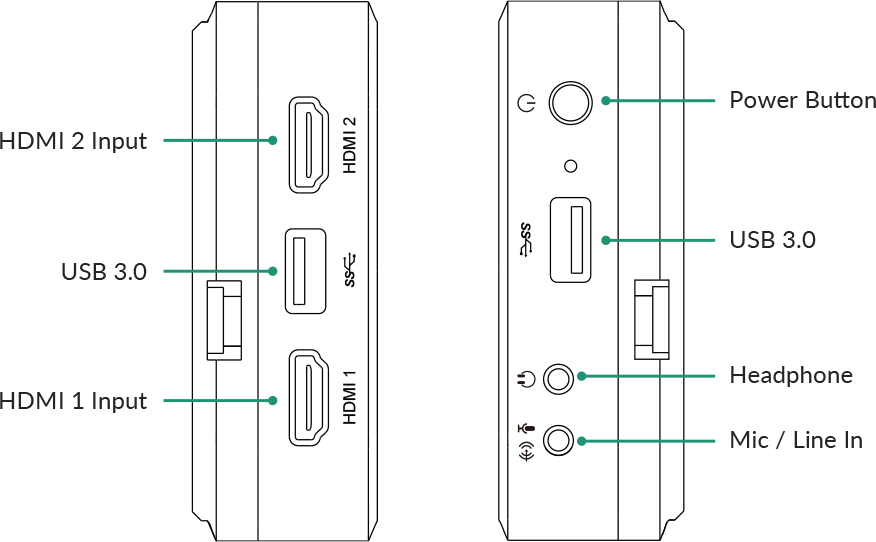
- Port: 2x HDMI 1.4 Type-A port
- Typical resolution/frame rate:
- 4096x2160p/3840x2160p 23.98/24/25/29.97/30/59.94/60
- 1920x1080p 23.98/24/25/29.97/30/50/59.94/60
- 1920x1080i 25/29.97/30
- 1280x720p 23.98/24/25/29.97/30/50/59.94/60
- 720x576p 50/100
- 720x576i 25/50
- 720x480p 59.94/60
- 720x480i 29.97/30
- Color depth: 8/10/12-bit
- Color sampling: RGB 4:4:4, YCbCr 4:4:4, YCbCr 4:2:2
- USB
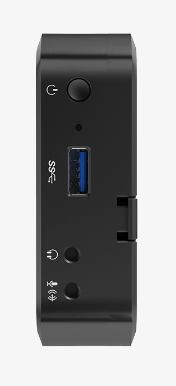
- Port: 2x USB 3.0 Type-A port
- Resolution/frame rate: Up to 1920x1080p, 60fps
- Codec: YUYV, MJPG, NV12
- Phone Camera
- Connection mode: LAN
- Resolution/frame rate: Up to 1080p, 60fps
- SRT stream
- Resolution/frame rate: Up to 1080p, 60fps
- RTMP stream
- Resolution/frame rate: Up to 1080p, 60fps
- NDI stream
- NDI® HX2 or NDI® HX3
- Resolution/frame rate: Up to 1080p, 60fps
- Video
- Resolution: Up to 4K
- Codec: H.264
- Format: MOV/MP4
- Picture
- Format: JPEG/PNG/BMP
Audio Input
- Mic/line in: 1x 3.5mm jack, 2-channel, 48 KHz, 16-bit
- Audio input from HDMI port: 2-channel, 48 KHz, 16-bit
- Audio input from USB port: 2-channel (only microphone supported)
- Audio input from phone microphone
- Audio from SRT stream
- Audio from RTMP stream
- Audio from NDI stream
- Audio embedded in video files
- Background music (BGM): MP3, M4A, WAV files
Video Output
- Streaming and recording
- Resolution: 1080p, 720p, 540p, 360p (only for NDI)
- Frame rate: 60fps, 30fps, 15fps
- Bitrate:
- NDI® HX3: up to 62.0Mbps, down to 1.5Mbps
- Others: up to 30.0Mbps, down to 256kpbs
- Key frame interval: customizable
- Profile: High profile, Main profile, Baseline profile
- Bitrate mode: VBR, CBR
- USB-C DP-OUT
- Port: 1* USB 3.0 Type-C port
- Display: 1920×1080
- Frame rate: 60fps
- Sampling format: RGB 4:4:4
Audio Output
- Streaming and recording: 2-channel, 16-bit, 48 KHz, aac, 64kbps/96kbps/128kbps
- Headphone output: 1x 3.5mm jack, 2-channel, 48 KHz, 16-bit
- Audio output via Bluetooth device: 2-channel, 48 KHz, 16-bit
- Audio output via USB-C OUT port: 2-channel, 48 KHz, 16-bit
- Audio output via USB-A port: 2-channel, 48 KHz, 16-bit
Features of USB-A Port
- Connect to a USB A/V device, such as webcam, USB microphone, USB speaker, etc.
- Connect to a USB flash drive
- To transfer video, picture, audio and other media files, firmware update files, log files, etc.
- Supported system format: FAT32, exFAT and NTFS
Features of USB-C OUT Port
- Connect to an external screen
- Connection mode: Connect the device to a monitor with a USB-C to HDMI/VGA/DP adapter
- A/V display mode options: Clean Program, Duplicate Screen, Loop HDMI 1, Loop HDMI 2
- Image rotation: Rotate 90° to left, or rotate 90° to right
- Connect to a computer
- Transfer video, picture, audio and other media files, firmware update files, log files, etc.
Network
- Supports Ethernet and WiFi
- Ethernet: 1x RJ45 port, 10/100/1000 Mbps Base-T
- WiFi: 2.4G/5G, Station and AP modes supported
- Supports Bluetooth for audio monitoring with Bluetooth devices
- Bluetooth: BT 5.0
Features
- Show
- Supports creating multiple shows in landscape (16:9) or portrait (9:16) mode, and manage them
- Scenes
- Supports creating multiple scenes in a show, and managing them
- Supports adding various sources, including HDMI, WEBCAM, video, picture, RTMP stream, SRT stream, phone camera, NDI stream, text and color
- Supports multi-view composition in one scene
- Provides lots of editing tools, including keyer, crop, transition, etc.
- Supports switch scenes directly or preview at first and then switch
- Supports switching scenes with an instant cut or fade effect.
- Audio
- Supports displaying level and peak through audio meter
- Supports adjusting the level of each input audio, output and monitor audio
- Supports AFV (Audio-follow-video)
- Supports solo monitor
- Supports switching microphone device
- Supports switching monitor device
- GFX
- Supports multiple GFX types, including title, lower third, animated text, digital clock, analog clock, bullet list, social media, logo, scoreboard, timer, stopwatch, custom picture and text
- Supports displaying multiple GFXs, and managing them
- Supports controlling scoreboard, timer and stopwatch in real time
- BGM
- Supports adding BGM for each scene and controlling in real time
- Pen
- Annotates on the screen in real time
- PTZ control
- Supports controlling PTZ camera via the network, supporting Visca UDP, supported sources including HDMI, WEBCAM (UVC camera), SRT stream, RTMP stream, and NDI stream
- Live stream
- Natively supports streaming to YouTube, Twitch and Facebook Live
- Supports streaming with SRT and RTMP protocols
- Supports two NDI® HX3 outputs
- Supports customizing encoding parameters and selecting the encoding source for ISO streaming
- Supports streaming to two destinations simultaneously
- Supports showing live comments when streaming to social media
- Record
- Supports customizing encoding parameters and selecting the encoding source
- Supports saving recording files in MP4 or MOV format to local storage or SD card
- Supports saving screenshot files in PNG format to local or SD card
- Supports splitting recording files by time or size, up to 1 hour or 4G
- Supports exporting or downloading files through computer, SD card, USB flash drive, App, or Web UI
Director Utility App
- OS version: iOS 11 and later, Android 7.0 and later
- Phone Camera: Use a phone as a camera
- Stream images taken by the phone to Director device
- Stream images taken by the phone to a destination via SRT
- Remote Assistant: Control Director device remotely
- Switch and manage scenes, set switch mode and effect, implement FTB, free scene, and control PTZ camera
- Switch and manage GFX, edit GFX text and picture in real time, and control scoreboard, timer and stopwatch
- Control audio, including adjusting audio level, switch microphone and monitor device, mute audio and monitor audio exclusively
- Start/stop recording, take screenshots, and manage album files
- Set streaming servers, start/stop streaming, view streaming status and speed, and view live comments
- Control and manage BGM
- View real-time device status
- Power off the device remotely
Web UI
- Set and manage device
- Switch and manage scenes, set switch mode and effect, implement FTB, freeze scene, and control PTZ camera
- Switch and manage GFX, edit GFX text and picture in real time, and control scoreboard, timer and stopwatch
- Control audio, including adjusting audio level, switch microphone and monitor device, mute audio and monitor audio exclusively
- Start/stop recording, take screenshots and manage album files
- Set streaming servers, start/stop streaming, view streaming status and speed, and view live comments
- Control and manage BGM
- Control media files
- View real-time device status
- Supports registering Magewell Control Hub (V2.1.20 and later) for centralized management
Screen
- Size: 5.44″
- Type: AMOLED
- Aspect ratio: 16:9
- Resolution: 1920×1080
- Brightness: 350 nits
- Color depth: 8-bit
- Contrast ratio: 6000:1
- Color gamut: 105% NTSC
- Refresh rate: 60Hz
- Viewing direction: All
- PPI: 405
- Touchscreen: Capacitive
- Screen coating: Anti-fingerprint coating
Storage
- Local storage: 64 GB
- SD card (not supplied): FAT32 (Under 128G), NTFS, exFAT
Dimensions
- 147.2 mm x 90 mm x 28.5 mm
Power
- AC power
- Power input: 12V/1.5A
- Maximum power consumption: 15W
- Battery pack
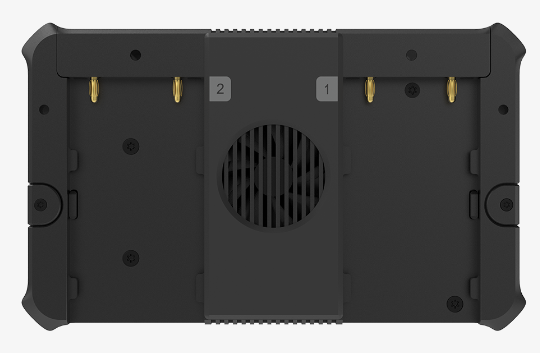
- 2x DC 7.4V (NP-F battery packs, not supplied)
- Hot swappable
Battery Indicators
- QTY: 2
- Green: 50% – 100%
- Orange: 25% – 50%
- Red: <25%
- Off: depleted
Working Environment
- Operating temperature: –10 to 50 deg C (AC power)
- Storage temperature: –20 to 70 deg C
- Relative Humidity: 5% to 90% non-condensing
OTHERS
- 5.44″ AMOLED capacitive touchscreen
- Warranty: 2 years for the whole device, 1 year for the screen
- Form factor: 147.2mm (L) x 90mm (W) x 28.5mm (H) or 5.79in (L) x 3.54in (W) x 1.12in (H)